Skip to product information
1 of 16

J5create USB-C Triple Display Docking Station with 100W PD Adapter - JCD543P

J5create USB-C Triple Display Docking Station with 100W PD Adapter - JCD543P

Regular price R 3,239.00 ZAR
Regular price Sale price R 3,239.00 ZAR
Sale Sold out
Taxes included. Shipping calculated at checkout.

Ready to ship in 2-4 days

The USB-C™ Triple Display Docking Station provides extra connectivity from your computer. Extend up to three monitors through HDMI, VGA, and DisplayPort™ or HDMI. This docking station is designed to be used as a notebook stand, which assists with heat dissipation. With its flexible USB-C™ cord, it keeps in mind the location of the USB-C™ port on your device, ensuring an easy connection.

These multi-adapters allow you to add an additional USB™ 3.1/SD™/microSD™ computer peripheral, HDMI™/DisplayPort™/VGA monitor and Gigabit Ethernet through your USB™ port. One of the USB™ Type-A ports supports fast charging BC1.2 for a smartphone, tablet or iPad®. The USB-C™ port supports power delivery 3.0, allowing you to keep charging your notebook or smartphone while using the adapter.

FEATURES:

  • USB-C™ power delivery 100W pass-through
  • USB-C™ downstream port Gen 1 5G x1;Power delivery adapter in port x1
  • USB™ Type-A downstream port Gen 1 5G x3
  • DisplayPort™ Alt mode supported
  • DisplayPort™/HDMI™ output 4K @ 30 Hz
  • USB™ graphic HDMI™ resolution 4K @ 30 Hz; VGA Resolution 1920 x 1080 dual output
  • RJ45 Gigabit Ethernet
  • SD™/microSD™ card slots allow for external memory access
  • Combo audio jack mic/speaker
  • Cable length 1.5 ft/45 cm

System Requirements:

  • Available USB-C DisplayPort Alt mode
  • Available USB-C port (USB 3.0 is recommended)
  • Available USB power delivery over USB-C to support upstream charging
  • 4K capable graphics card
  • Microsoft® Windows® 10 or later
  • macOS® 10.14 or later

Special Notes:

  •  If you are using a high-powered USB device, attach the USB-C power adapter to the power delivery port to ensure maximum performance.
  • To ensure files copy completely, do not remove the USB-C™ power adapter while copying files. For maximum performance, use a computer and USB-C™ power adapter equipped with PD 3.0.
  • Driver installation is required for macOS® and Windows®. If the computer has network access and administrative rights, Windows® can automatically install the driver when the device is plugged in.

SPECIFICATIONS:

  • Host: USB-C™ male connector with cable
  • Video Ports:

    • HDMI™ ×2
    • DisplayPort™ ×1
    • VGA ×1
  • USB-C™ Ports:

    • Downstream ×1
    • Power-in ×1
  • Ethernet: RJ45 (Gigabit) ×1
  • USB Ports: USB™ Type-A 3.1 (5 Gbps) ×3
  • Card Slots:

    • SD™ 3.0 ×1
    • microSD™ 3.0 ×1
  • Audio: Combo jack (mic + speaker)
  • Bus-powered or self-powered
  • DisplayPort™: 4K @ 30 Hz
  • HDMI™: 4K @ 30 Hz
  • VGA: 1920 × 1080 @ 60 Hz
  • Power Delivery 3.0 ×1
  • USB-C™ 3.1 port ×1
  • USB-A 3.1 ×3 (Gen 1, 5 Gbps)
  • BC 1.2 ×1
  • Speed: 1000 Mbps (half/full duplex)
  • Standards: IEEE 802.3az, 802.3, 802.3u, 802.3ab, 802.3x
  • Features:
    • Wake-on-LAN, suspend, remote wake
    • VLAN tagging (802.1Q), 2 VLAN ID filtering
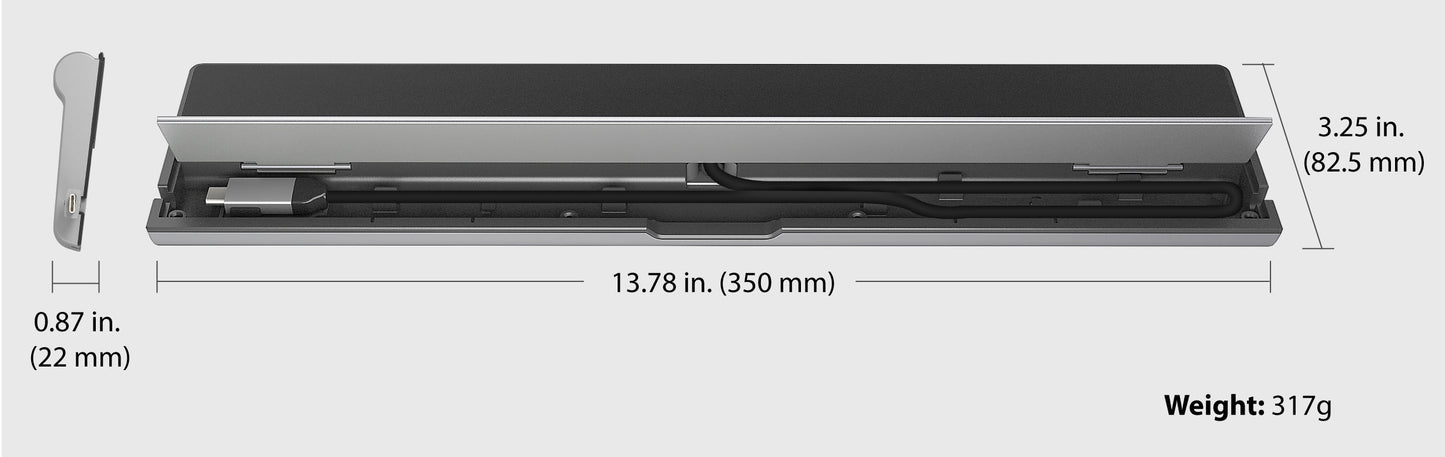
  • 3.24 × 0.92 × 13.78 in
  • 82.5 × 23.4 × 350 mm
  • Cable Length: 1.5 ft (450 mm)
  • Weight: ~0.66 lbs (300 g)
  • Storage:
    • Temp: -10 to 65°C
    • Humidity: <85% (non-condensing)
  • Operating:
    • Temp: 0 to 40°C
    • Humidity: <85% (non-condensing)

WHAT'S IN THE BOX:

  •  USB-C Triple Monitor Docking Station x1
  • Quick Installation Guide x1
  • 100W USB-C Power Adapter x1

WARRANTY:

  • 24 Months
View full details